
![Samsung Side-by-Side Fridge [Energy Class E]](https://cdn.staticsaa.com/uploads/69188/cart/resources/20251124/3E9509E4-5103-D9DB-2ACF-B5C12D2CE6B8.jpg)
![Samsung Side-by-Side Fridge [Energy Class E]](https://cdn.staticsaa.com/uploads/69188/cart/resources/20251124/E22AAD4D-82EC-6C61-735D-345C76C8DD39.jpg)
![Samsung Side-by-Side Fridge [Energy Class E]](https://cdn.staticsaa.com/uploads/69188/cart/resources/20251124/1C4A0491-E672-5735-F291-741158803C09.jpg)
![Samsung Side-by-Side Fridge [Energy Class E]](https://cdn.staticsaa.com/uploads/69188/cart/resources/20251124/21B0E4CC-EE91-FC1D-E648-C6217F3197FF.jpg)
![Samsung Side-by-Side Fridge [Energy Class E]](https://cdn.staticsaa.com/uploads/69188/cart/resources/20251124/0ED609A0-CC5D-FA29-B83C-6180DE552D53.jpg)
![Samsung Side-by-Side Fridge [Energy Class E]](https://cdn.staticsaa.com/uploads/69188/cart/resources/20251124/66EC77D0-CE0C-7894-98E7-57521C812279.jpg)
![Samsung Side-by-Side Fridge [Energy Class E]](https://cdn.staticsaa.com/uploads/69188/cart/resources/20251124/522E1369-3754-408C-BCB5-23DABFC1B96C.jpg)
![Samsung Side-by-Side Fridge [Energy Class E]](https://cdn.staticsaa.com/uploads/69188/cart/resources/20251124/0C5140B1-ECCC-BF62-F2DE-E692C2E6251E.jpg)
![Samsung Side-by-Side Fridge [Energy Class E]](https://cdn.staticsaa.com/uploads/69188/cart/resources/20251124/155FE022-3E5C-1A2A-56B2-0EE0477A1F55.jpg)
![Samsung Side-by-Side Fridge [Energy Class E]](https://cdn.staticsaa.com/uploads/69188/cart/resources/20251124/1D2FA275-8C0F-3107-814B-1CF5E0C0F0AF.jpg)
![Samsung Side-by-Side Fridge [Energy Class E]](https://cdn.staticsaa.com/uploads/69188/cart/resources/20251124/DAFE6FA2-9A3E-7B97-DAA9-823C5E257A5E.jpg)
![Samsung Side-by-Side Fridge [Energy Class E]](https://cdn.staticsaa.com/uploads/69188/cart/resources/20251124/66A6F3DE-DC36-F1A6-61A8-891ABBDF6D22.jpg)
![Samsung Side-by-Side Fridge [Energy Class E]](https://cdn.staticsaa.com/uploads/69188/cart/resources/20251124/1289FB3C-1F50-F557-DA14-E445DE057633.jpg)
![Samsung Side-by-Side Fridge [Energy Class E]](https://cdn.staticsaa.com/uploads/69188/cart/resources/20251124/BFE39066-17F7-901D-38F7-DD3B35938F52.jpg)
![Samsung Side-by-Side Fridge [Energy Class E]](https://cdn.staticsaa.com/uploads/69188/cart/resources/20251124/F9CBCDD7-19B9-23AE-A25B-7C975BD717D7.jpg)
![Samsung Side-by-Side Fridge [Energy Class E]](https://cdn.staticsaa.com/uploads/69188/cart/resources/20251124/5CAD7C6B-C3EA-984B-8EAC-7A3F90B259EB.jpg)
Samsung Side-by-Side Fridge [Energy Class E]
-
Detail
| Product dimensions | 71.6D x 91.2W x 178H centimetres |
| Brand | Samsung |
| Capacity | 591 litres |
| Configuration | Fixed water connection |
| BEE Star Rating | 5 Star |
| Colour | Premium Black Steel |
| Special feature | Recipes app, Food Cam & Food Reminder, Phone & TV Mirroring |
| Installation type | Freestanding |
| Number of doors | 2 |
| Defrost system | Yes |
About this item
- Three cameras inside the refrigerator show you your chilled food on your compatible mobile device anytime, anywhere. The pictures of the cameras are easily sent to your smartphone or tablet via the Smart Home app/Smart Connect app and display the contents of the shelves, so you can take a quick look into the fridge even when shopping or on the go
- Stream content from your compatible TV or smartphone directly to the Family Hub. This means that your favourite shows or holiday photos appear directly in your kitchen on the 21.5 inch touch screen and can be used comfortably
- Easily find delicious and practical recipes. Choose from over 180,000 recipes with the recipe app or get suggestions based on ingredients in the fridge. The Club of the Chefs app shows you recipes from 3-star Michelin chefs from the chef's Samsung Club
- The calendar, timetables and appointments of the whole family always at a glance with the family calendar. Create an individual profile for each family member. It can also leave notes and be updated in real time. So a networked fridge helps you organise the whole family
- Enjoy chilled water at any time with the practical water and ice dispenser and look forward to plenty of ice cubes with which you can serve refreshing drinks

Enjoy the pleasant life with Family Hub
Enrich your family life with the Family Hub. It helps you to use and shop food effectively, as well as control smart devices. You can also listen to music, watch TV* and use built-in or any apps on your smartphone** It even provides a fun way to share messages, photos, videos, information and schedules.

Look what's in your fridge from anywhere
View Inside (+ automatic display of the expiry date). See what's in the fridge anytime and anywhere on your smartphone or via the home screen. View Inside cameras* show what food you have in stock so you can check out when shopping. In addition, food expiry data is automatically displayed and you can create shopping lists, food notes or reminders.

Easy to prepare your family's favourite foods with quick planning
Cook the food your family loves. Using artificial intelligence and food profiles, the recipe app provides delicious recipes with simple instructions and can send the right settings to the oven. A weekly meal planner suggests meals you can cook every day, based on what you like and on the food in the fridge

Efficient shopping
Plan meals and buy food you need with the shopping list app. Simply add required items or ingredients to your list by touch or voice command. Then you can add it to your favourite online shop*. If you sync the list with your smartphone, you can also check it in a shop.
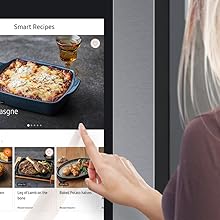
Easy to find and manage your recipes with Smart Recipes
Cook dishes that your family loves. The Recipe App provides delicious recipes you will like along with simple instructions, and it can send the right settings to the oven*. You can also easily find new recipes by using different search options or simply ask Bixby and save your favourites.

Suggests the optimal settings for smart ovens
Save time and effort when preparing meals. With the "Recipe to Oven" function, Family Hub can recommend recipes for Smart Ovens* and monitor cooking progress. Select a recipe from "Smart Recipe" and click the "Send to Oven" button and suggests the best settings for your Smart Oven.

Non-stop music and entertainment at any time
Increase your cooking pleasure and entertain your guests at a party. Enjoy music without interruption by listening to your favorite playlists, songs and artists with Spotify or Amazon Music* Or stream nonstop entertainment with access to worldwide radio stations, news, podcasts and comedy shows on TuneIn.

With SmartView you can look at your mobile phone while cooking or see far away
Watch TV programs or access online content. A widget allows you to quickly launch popular video streaming or social media apps. The app "SmartView" can also view what's running on any Samsung Smart TV*, and lets you view and control the millions of apps available on your smartphone**

Easy access to websites and online services
Access your favourite web services* without using a PC or mobile device. With the built-in Internet browser app, you can view online content such as messages, social media and much more. You can also create links on the home screen or save links to popular websites so you can quickly access them.

Easily share family moments and messages
Enrich your family life by easily sharing news, messages, special moments and now also photos and videos on the family board. Simply use the home screen to share photos and video clips, post stickers, draw pictures, type notes or write by hand, share appointments and website links or even add a music player.

Immediately receive useful information and messages
Stay up to date with important information! The morning letter automatically displays the weather forecast, food related reminders and your calendar* on the screen of the fridge - at a fixed time or when you open the door. Or you can activate it with Bixby voice recognition. It can also display the latest messages.
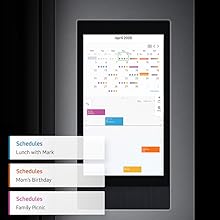
Never forget important family events again
Make sure you never miss a family event. With the calendar app, you can share the appointments of family members and check at a glance. You can update entries on the fridge or via a smartphone and sync the appointments with Google and Microsoft calendars*. So you no longer forget important appointments
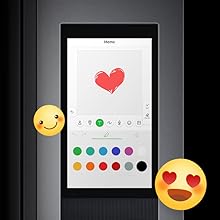
Stay in touch with the whole family in an easy way
Enjoy a truly fun and effective way to communicate with your family. Memo, to-do and gallery apps allow you to quickly share memos, to-do lists, instructions, activity plans, and photos. When someone steps near the refrigerator, the home screen turns on so that the person in question can see what you have shared.

Easily smarter control over your home with SmartThings
Turn your home into a smarter home with SmartThings*. With your voice or touch the screen, you can control smart devices immediately. You can turn them on and off, adjust settings, coordinate activities and limit power consumption. You can also monitor up to 6 cameras around the house via the widget.
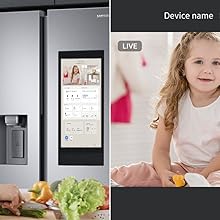
Check what happens in every room with SmartThings Cams
Easily check what's happening in your home. The SmartThings Cam app connects to all compatible Wi-Fi enabled video cameras*, so you can see different areas on the home screen. If you have installed a 360 degree camera, you can also adjust the camera angle and view the whole room.
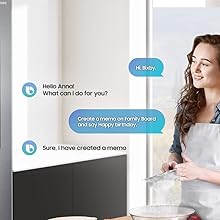
Enjoy a smarter way to live with Bixby
Make your life much easier and more efficient with Bixby* used on Samsung Galaxy brand smartphones. Just say what you want to do, and Bixby does it, from setting alarms to recommending recipes. It even adapts to your needs by learning your routines and preferences, making it more and more helpful over time.
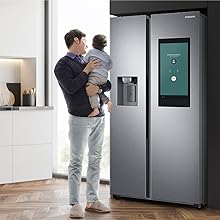
Make and answer phone calls in hands-free operation
Make or answer calls while cooking without holding a phone in your hand. Bluetooth connectivity allows the fridge to connect seamlessly to your smartphone*. So you can easily answer calls or call other people by simply using your voice. In addition, there is less risk of dropping the device or damaging it with sticky fingers
Technical Details
| Brand | Samsung |
|---|---|
| Model | RS6HA8891B1/EG |
| Product Dimensions | 71.6 x 91.2 x 178 cm; 117 kg |
| Item model number | RS6HA8891B1/EG |
| Weighted Annual Energy Consumption | 346 Kilowatt Hours Per Year |
| Capacity | 591 litres |
| Annual Energy Consumption | 346 Kilowatt Hours Per Year |
| Capacity Total | 614 litres |
| Capacity cooling | 389 litres |
| Freezer Capacity | 225 Litres |
| Noise Level | 36 dB |
| Installation Type | Freestanding |
| Part Number | RS6HA8891B1/EG |
| Form Factor | Side By Side |
| Special Features | Recipes app, Food Cam & Food Reminder, Phone & TV Mirroring |
| Drawer Type | Inside |
| Colour | Premium Black Steel |
| Voltage | 2.3E+2 Volts |
| Wattage | 150 watts |
| Number of Racks | 8 |
| Number of Drawers | 4 |
| Defrost System | Yes |
| Door Orientation | Right |
| Door Material | Stainless Steel |
| Shelf Type | Glass |
| Number of Shelves | 8 |
| Certification | Energy Star, energy efficiency class E |
| Included Components | Cooling |
| Batteries Required? | No |
| Weight | 117 Kilograms |